“Our policy starts with two days, then adds one day, then another two. Can the HR system do that?”
Not every annual leave policy is a straight percentage calculation. People join midway through the holiday year, change working patterns, reach service milestones or carry forward some unused entitlement.
The problem is often not a lack of effort from HR. It is that the rules have more moving parts than a standard spreadsheet or a one-size-fits-all setting can comfortably manage.
Sense HR 7.0 adds richer entitlement settings to Calendar & Planner.
First, choose the type of entitlement period
Sense HR 7.0 distinguishes two types:
- Yearly: the entitlement resets each year in line with the employee’s Holiday year.
- Ongoing: the balance continues without a yearly reset.
The organisation can also configure a Holiday year at employee level, beginning with the first day of a chosen month. That matters where a business does not use the same January-to-December year for every employee.
The point is to capture the employer’s intended policy before deciding how much should be awarded.
Five ways to calculate Yearly entitlement
For Yearly entitlement, Sense HR 7.0 supports five calculation approaches.
Fixed: awards the full amount regardless of FTE or how much of the entitlement period the employee works. For example, one day of Birthday Leave for everyone.
FTE-based: adjusts the entitlement according to the employee’s full-time equivalent.
Pro-rata – daily: calculates using FTE and the days in the entitlement period. This is useful when the policy is sensitive to precise joining or leaving dates.
Pro-rata – monthly: uses FTE and complete months in the entitlement period, suitable for policies that operate in whole months.
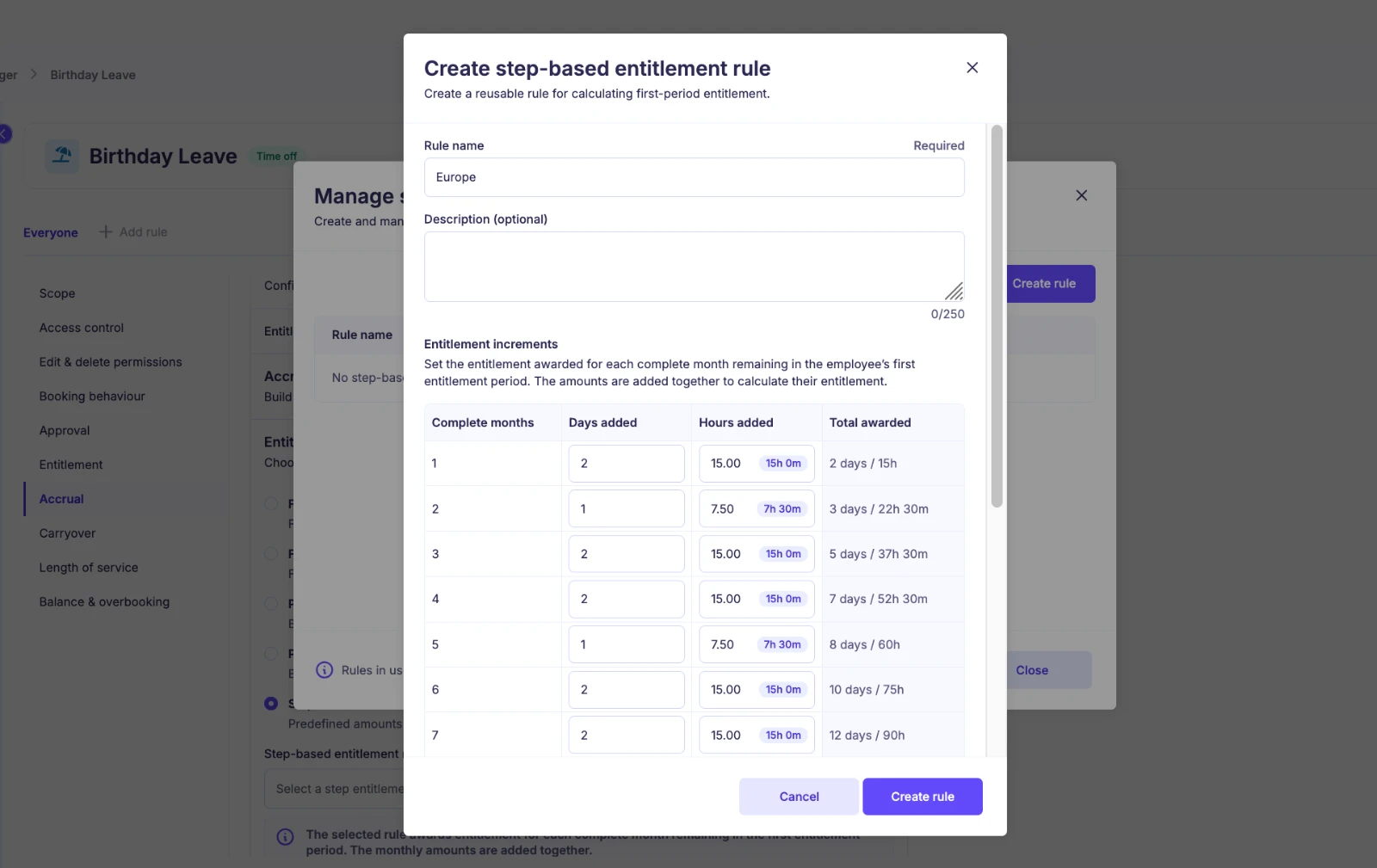
Step-based: lets administrators define increments by complete months in a part entitlement period.
These are product calculation options, not a statement that every method will be appropriate for statutory holiday entitlement in every employment situation. HR should check the configured approach against applicable law, contracts and policy.
Example: when entitlement grows in steps
Consider an internal policy that gives a new employee an incremental award according to the number of complete months in a part entitlement period.
The administrator configures:
- Month one: add 2 days.
- Month two: add 1 day.
- Month three: add 2 days.
The running totals are 2, then 3, then 5 days. An employee with three complete months in the relevant part entitlement period receives 5 days upfront under this example policy.
Sense HR’s Step-based table is designed for those policies that do not follow a tidy daily or monthly pro-rata formula.
Carryover: a balance that follows your rules
Unused Yearly entitlement does not always have the same treatment in every organisation.
Sense HR 7.0 lets administrators turn Carryover on or off and set maximum carryover amounts separately in Days and Hours. Leaving the maximum blank allows unlimited carryover.
That is a product setting, not legal advice. Employers still need to check whether their carryover policy and practices comply with the relevant employment rules and individual circumstances.
Length of service awards
Some employers increase contractual leave as employees stay longer.
In Sense HR 7.0, Length of service awards are cumulative. For example, a policy might start at 25 days, then adding 1 day at 12 months, another 1 day at 60 months and 2 days at 120 months. The resulting totals are 26, 27 and 29 days.
Administrators can choose whether an extra award lands at rollover or on the anniversary of the employee’s Employment start date. A Max entitlement can place a ceiling on the total.
Don’t forget the holiday year and Working hours
Before configuring rules, make sure the employee’s Holiday year and Working hours are correct. Sense HR also has a Standard working day (Hours) fallback when scheduled Working hours are not available or cannot be used for a calculation.
Incorrect settings can make a perfectly sensible policy appear to produce surprising results. Test typical full-year employees, joiners, leavers and changes in working pattern before rolling out a complex policy.
For the wider UK entitlement calculation context, Sense HR already has a separate pro-rata and part-time holiday entitlement article and a holiday entitlement guide. Read those for the statutory detail behind the settings described here.
Frequently asked questions
Does Sense HR 7.0 offer just one pro-rata method?
No. The Yearly calculation options include FTE-based, Pro-rata – daily and Pro-rata – monthly, alongside Fixed and Step-based.
Can entitlement increase after service milestones?
Yes. Length of service awards can be cumulative, with configurable timing and a maximum entitlement.
Can a policy carry forward days and hours?
Yes. Carryover maximums can be configured separately for Days and Hours.
The policy comes first. The calculation should follow.
An HR system is most useful when it records the entitlement policy you intend to apply, without requiring a separate set of workarounds every time somebody joins in September or reaches a long-service milestone.
Explore Sense HR Holiday & Leave Management and request a demonstration using a policy from your own handbook.
This guide is part of our Sense HR 7.0 release series. See everything that’s new in Sense HR 7.0.