Automate HR Admin

Let Routine HR Tasks Run Themselves

Sense runs repetitive HR admin in the background, so that manual tasks don't get in the way of managing your busiest teams. Choose from 100+ HR workflows to install, or build your own.

Watch 4 min video
Ready-Made Workflows

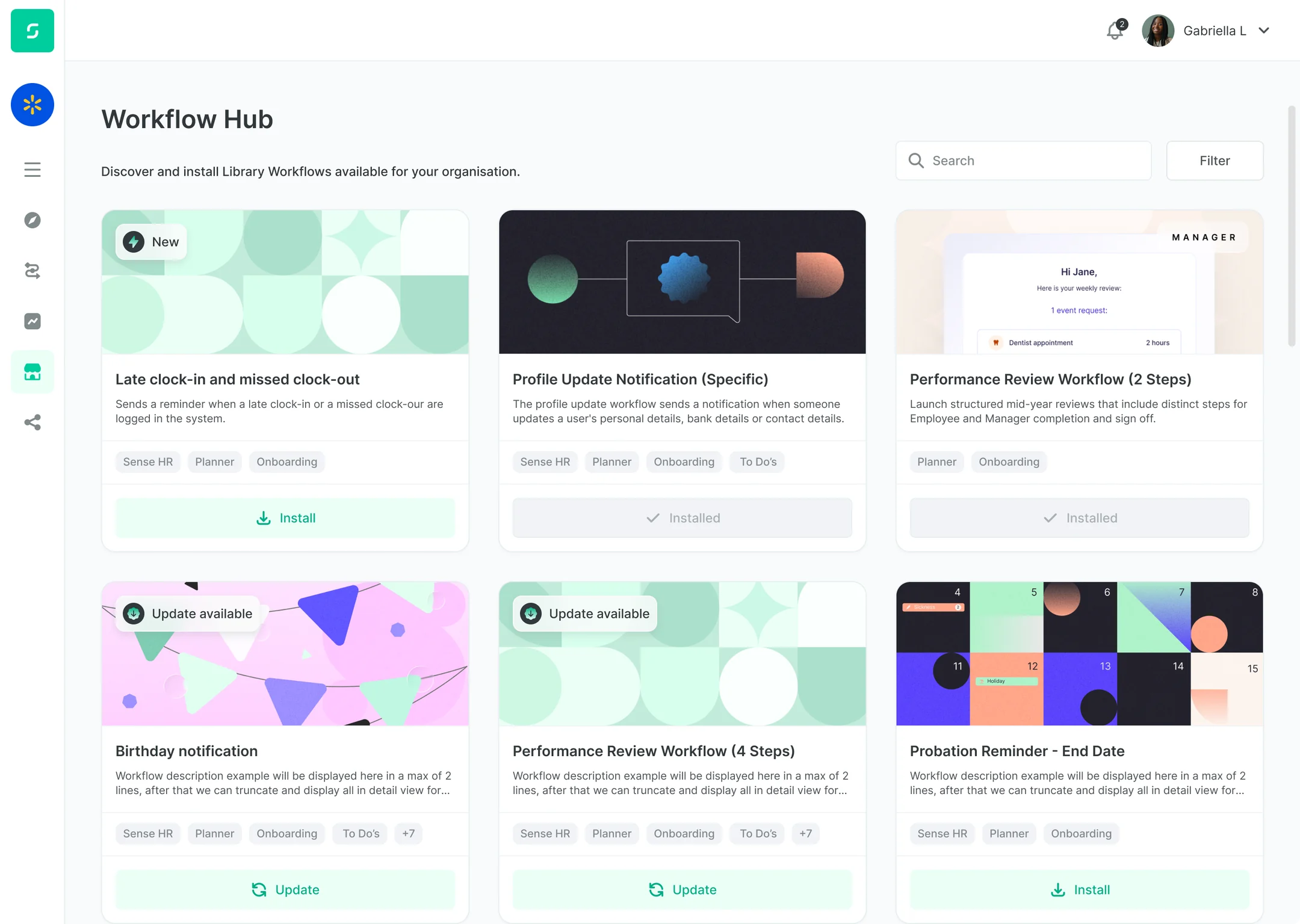
Install 100+ ready-made HR workflows

Browse our HR workflows and switch them on with a single click, from the Automate Hub. Automate everything from shift cover, staff onboarding, absence, holidays, TOIL calculations and more.

  • Return to work processes
  • Missed clock-in alerts
  • Probation reminders
See all workflows
The Workflow Hub: ready-made workflows such as Late clock-in and missed clock-out, each with an Install button
Make It Yours

Customise workflows to make them yours

Change the numbers and limits to suit your different teams or contract types. Configure things like leave entitlements, approvers, absence thresholds, or how many lates trigger an escalation.

  • Customise workflows to suit your teams
  • Set rules by team, contract type or location
AI Agents

AI agents that do the chasing

Ask AMI, your Sense AI assistant, to get a job done, and watch a team of specialist agents perform tasks for you, like sending out payslips, chasing signatures, checking attendance and setting follow up tasks.

  • Documents sent and chased
  • Attendance watched by Clockwise
  • Payslips sorted from bulk uploads
Meet AMI
Build Your Own Workflows

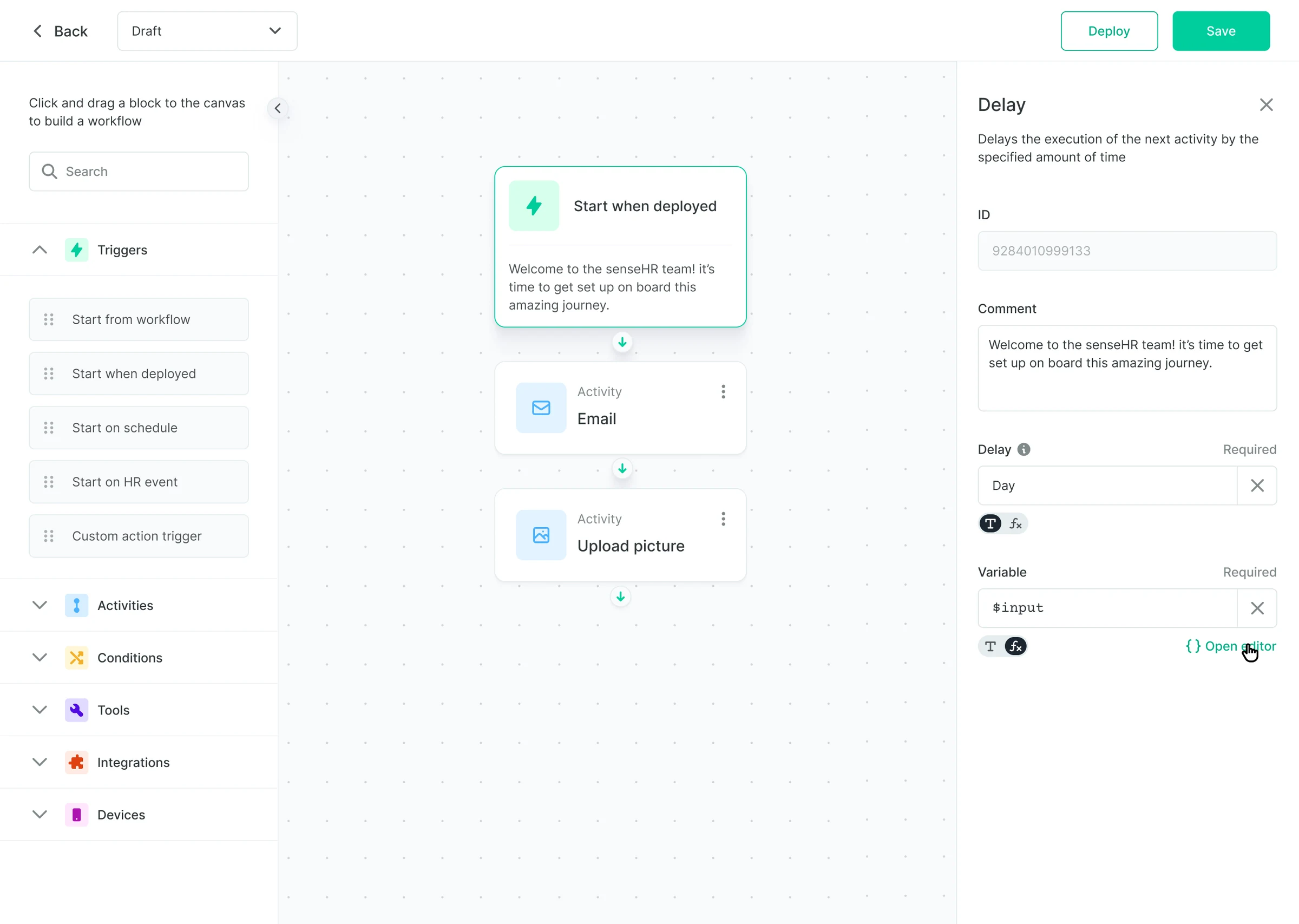
A no-code designer for custom processes

For complex processes, the no-code workflow builder lets you drag-and-drop triggers, steps and decisions, to automate things like emails, tasks, record updates, or data getting pushed and pulled from other systems.

Explore the workflow builder
  • Dynamic AutomationWorkflows that know who is on shiftYour HR workflows know who is in or out at every site, and adapt to fit the current situation. Install automations that handle people turning up late, forgetting to clock out, failing to take breaks, and more.
    • Late and missed clock-in alerts
    • Overtime and long shift warnings
    • No-show follow-ups for managers
    See time and attendance
  • Reach EveryoneConnect with your busy, deskless teamsKeep everyone in the loop with alerts, tasks and reminders via the Sense Badge or mobile app. People can sign documents, complete tasks, call for help or request holidays, even on shift, on site, or on the road.
    • No email or laptop needed
    • HR anywhere via the Sense app
    • Kiosk or Badge for staff without a phone
    See the mobile app
  • Connect Your SystemsWorks across HR, rotas, recruitment and payrollAutomate every process, even across external systems including payroll, recruitment, and more. Pre-built integrations include Xero, Microsoft and Slack, or you can build your own with our open API.See more integrations

Discover HR Automation for Yourself

Book an online demo with one of our UK-based experts, or start a free trial, to see how Sense takes routine HR admin off your plate for every shift, site and field team.

FAQ

HR Automation Questions

Browse these frequently asked questions about automating HR admin with Sense

What is HR workflow automation?

HR workflow automation means letting software run routine HR jobs for you, such as reminders, approvals, letters and follow-ups. In Sense, each workflow has a trigger, such as a sickness record or a missed clock-in, and a set of steps Sense carries out automatically, so nothing depends on someone remembering.

What HR tasks can I automate with Sense?

Sense comes with more than 100 ready-made workflows covering onboarding and leavers, sickness and absence, holidays and TOIL, clocking and attendance, timesheets and overtime, expenses, documents, compliance reminders, performance reviews and recruitment. Popular examples include fit note reminders after 7 days of sickness, return to work forms, probation reminders and missed clock-out alerts.

Do I need technical skills to automate HR workflows?

No. Ready-made workflows install from the Automate Hub in a few clicks, and you set the rules with simple options, such as how many days, who approves and who gets told. For your own processes, the no-code designer lets you drag and drop triggers, steps and decisions, or our team can build workflows for you.

Can HR workflows react to clock-ins and attendance?

Yes. Unlike most HR software, Sense workflows can start from time and attendance data as well as HR records. A late clock-in, a missed clock-out, a missed break, overtime or a no-show can trigger an alert to the manager, a follow-up task or a note on the employee's record, so problems on site are dealt with the same day.

How do shift, site and field staff receive workflow tasks?

Through the Sense app on their own phone, so they do not need a work email address or a laptop. Staff can sign documents, fill in forms, answer approvals and request holidays from the app, and people without a smartphone can use a wall-mounted kiosk or the Sense Badge.

Can workflows follow different rules for each site or team?

Yes. Set different rules, approvers and limits for each site, team, location or contract type, such as different holiday entitlements for part-time staff or a different lateness policy for one site. Backup approvers keep requests moving when a manager is away.

What is the difference between a workflow and an AI agent?

A workflow follows the rules you set, step by step, every time. An AI agent such as AMI, the Sense AI assistant, understands a request written in plain English and carries out the task, calling on specialist agents for jobs like chasing signatures, sorting payslips and checking attendance. A person still signs off anything that matters.

Do Sense workflows work with our payroll, rota and other systems?

Yes. Pre-built integrations connect Sense to tools such as Xero, Microsoft and Slack, and the open API lets workflows push data to, and pull data from, your other systems. Hours, absences and HR changes can flow into payroll without anyone typing them in twice.