Meet Payslip Sorter
AI agent Payslip Sorter takes bulk files of pay documentation such as Payslips or P60's, and attaches each document to the relevant employee record. Payslip Sorter also verifies each document against timesheet and clock data, to flag and eliminate errors and disputes.
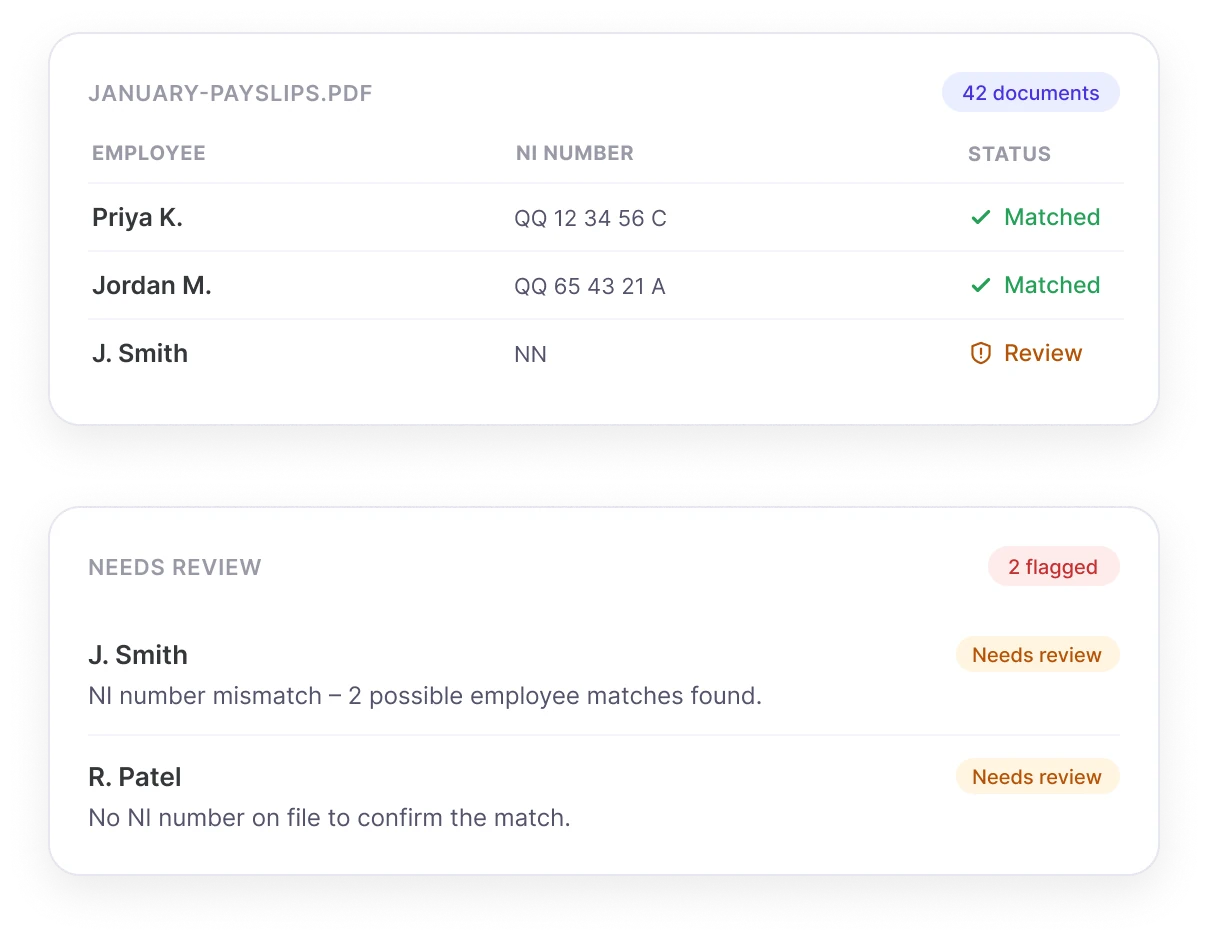
Uploaded January-payslips.pdf for 42 employees.
Matched 40 of 42 by name and NI number. 2 need your review before sending.
Watch this short video to learn more about Payslip Sorter
 Payslip Sorter: one upload, every record matched
See how Payslip Sorter works
- 01Upload Bulk FileE.g. payslips, P60s, P11Ds.
- 02Auto-MatchPayslip Sorter checks name and NI number to match records.
- 03Scan For ErrorsChecks for obvious errors against attendance data.
- 04Review And ConfirmNothing files without your sign-off.
- 05Attach And SendEach file gets attached to the correct employee's record.
Payslip Sorter removes the need for you to manually unpack and attach each pay document to each employee's record.
Bulk Send Pay Documents
Upload one bulk file, and Payslip Sorter splits, matches and checks it, before preparing it to be added to each employee's record.
- Mass-Sort Payroll DocumentsUpload a single PDF with every employee's payroll documents, and let Payslip Sorter match and distribute each file to the right person in one swift action.
- All Payroll Records IncludedPayslip Sorter can handle all types of pay documentation, including payslips, P60s, and P11Ds — upload a bulk file of any type pay document, and Payslip Sorter will figure it out.
- Match By IdentifiersPayslip Sorter matches each document to the correct person by matching personalised identifiers like full name and national insurance number, for maximum accuracy.
- Match VerificationPayslip Sorter will show you which document will be sent to who, as well as any flags it couldn't confidently match. Nothing is sent without your review and confirmation.
Reduce Payroll Errors
Payslip Sorter checks pay documents against other areas of your HR system, such as timesheets or attendance data, to spot obvious errors in pay.
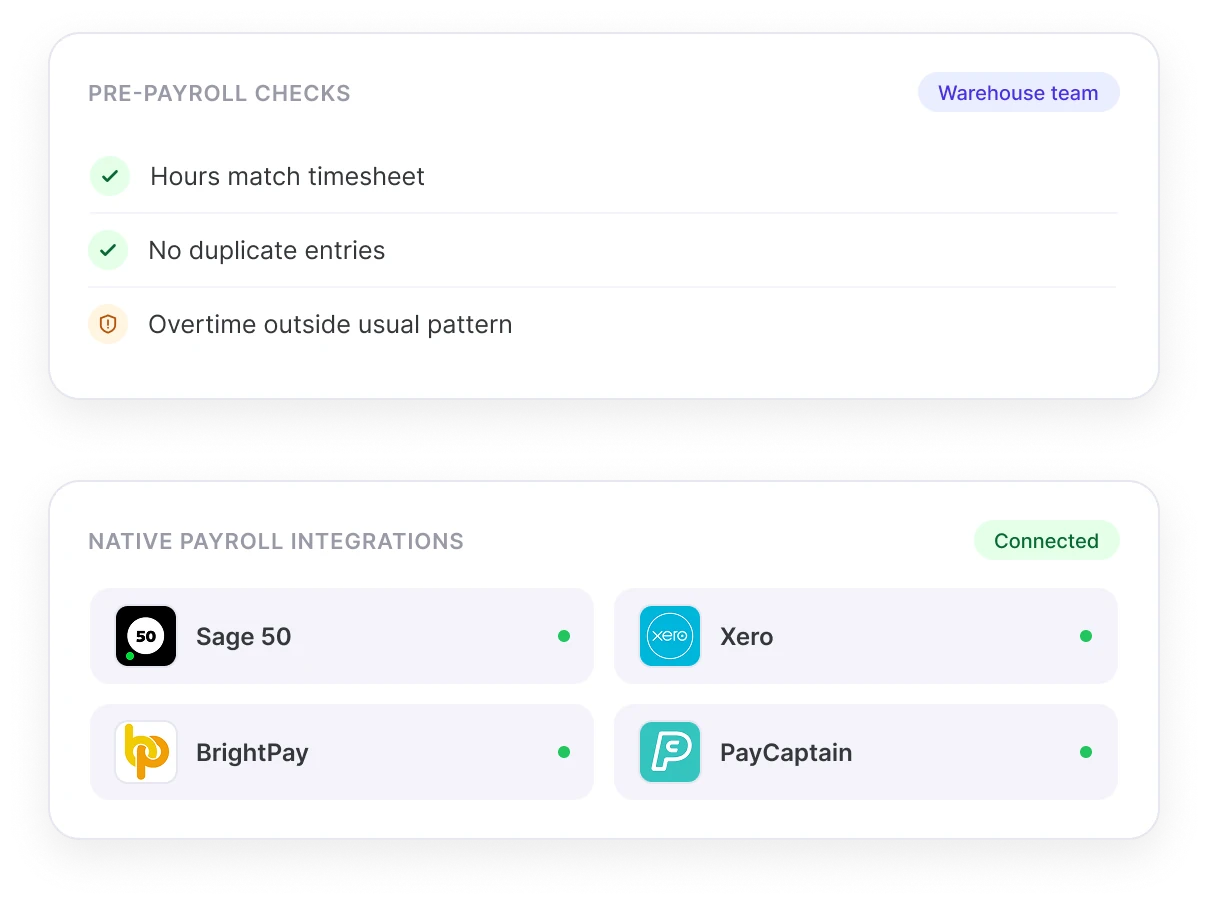
- Run Pre-Payroll ChecksPayslip Sorter verifies payroll data against timesheets and attendance data, to flag anomalies such as missing hours, duplicate entries, or unusual patterns before sending data to payroll.
- Reduce Pay DisputesPayslip Sorter can catch missed clock-ins, unpaid overtime, or unusual timesheet entries, to help you resolve pay discrepancies before they turn into disputes.
- Native Payroll IntegrationsPayslip Sorter already integrates on a two-way basis with the UK payroll systems customers are already using, including Sage 50, Xero, BrightPay and PayCaptain.
Meet Payslip Sorter in Person!
Share your contact details and one of our HR experts will be in touch to show you how Payslip Sorter takes bulk pay documents, distributes them across employee records, and flags any suspected errors or anomalies.
Common questions
What is Payslip Sorter?
Payslip Sorter is an AI agent within Sense HR that takes a single bulk file of pay documents, such as payslips, P60s or P11Ds, matches each document to the correct employee, and attaches it to their record automatically.
How does Payslip Sorter match documents to the right employee?
Payslip Sorter matches each document using identifiers such as full name and National Insurance number, and shows which document is going to which employee before anything is sent, so nothing is filed without review and confirmation.
What types of pay documents can Payslip Sorter handle?
Payslip Sorter can handle the common types of UK pay documentation, including payslips, P60s and P11Ds, from a single bulk upload.
Does Payslip Sorter check for payroll errors?
Yes. Payslip Sorter cross-checks pay documents against timesheet and attendance data already held in Sense HR, to flag anomalies such as missing hours, duplicate entries or unusual patterns, before the data reaches payroll.
Which payroll systems does Payslip Sorter work with?
Payslip Sorter integrates natively, on a two-way basis, with Sage 50, Xero, BrightPay and PayCaptain.
Does Payslip Sorter send documents automatically, or does someone review them first?
Payslip Sorter shows a match preview, including any documents it couldn't confidently match, and nothing is sent or filed until a person has reviewed and confirmed it.
How can businesses automate payslip distribution?
Rather than manually opening a bulk PDF of payslips and attaching each one individually to an employee file, businesses can use tools that automatically split, match and file a bulk pay document to the correct employee record based on identifiers like name and National Insurance number.
What causes most payroll disputes?
Common causes of payroll disputes include missed clock-ins, unpaid or miscalculated overtime, and unusual or unexplained timesheet entries that don't match what was actually worked. Catching these discrepancies before payroll runs, rather than after employees are paid, helps prevent disputes before they happen.
How can small businesses reduce payroll administration time?
Common time-saving steps include integrating time and attendance data directly with payroll, automating the distribution of payslips and year-end documents like P60s, and using automated checks to catch data errors before they reach a payroll run, rather than correcting them after the fact.
What is the difference between a P60 and a P11D?
A P60 is an end-of-year summary of an employee's total pay and the tax deducted from it over the tax year, which employers must give employees by law. A P11D is used to report certain benefits and expenses provided to an employee that aren't put through payroll, such as private medical insurance or a company car.
Is payroll data handled by Payslip Sorter kept secure?
Yes. Sense is ISO 27001 certified, and payroll documents processed by Payslip Sorter are stored in secure, UK-hosted data centres compliant with GDPR, and are never used to train any AI models.