“Can the warehouse team require holiday approval while the directors self-book?”
It sounds like a simple policy distinction. But in some HR systems, the workaround is to duplicate the leave type: Holiday (Warehouse), Holiday (Directors), Holiday (Office) and so on.
Before long, the same type of absence exists under several names, each with its own settings and potential for mistakes.
Sense HR 7.0 takes a different approach. A Working or Time-off Event can have multiple rules, and each rule can apply to a different group of employees.
One Event, different behaviour
The underlying Event stays the same. The rules decide how it works for the people they apply to.
For example:
- A warehouse team may need approval before its holiday request is confirmed.
- A director group may be allowed to self-book the same Event.
- Another group may have the Event entered on its behalf, according to its setup.
The new structure is designed for organisations whose policies are not identical across every role or location.
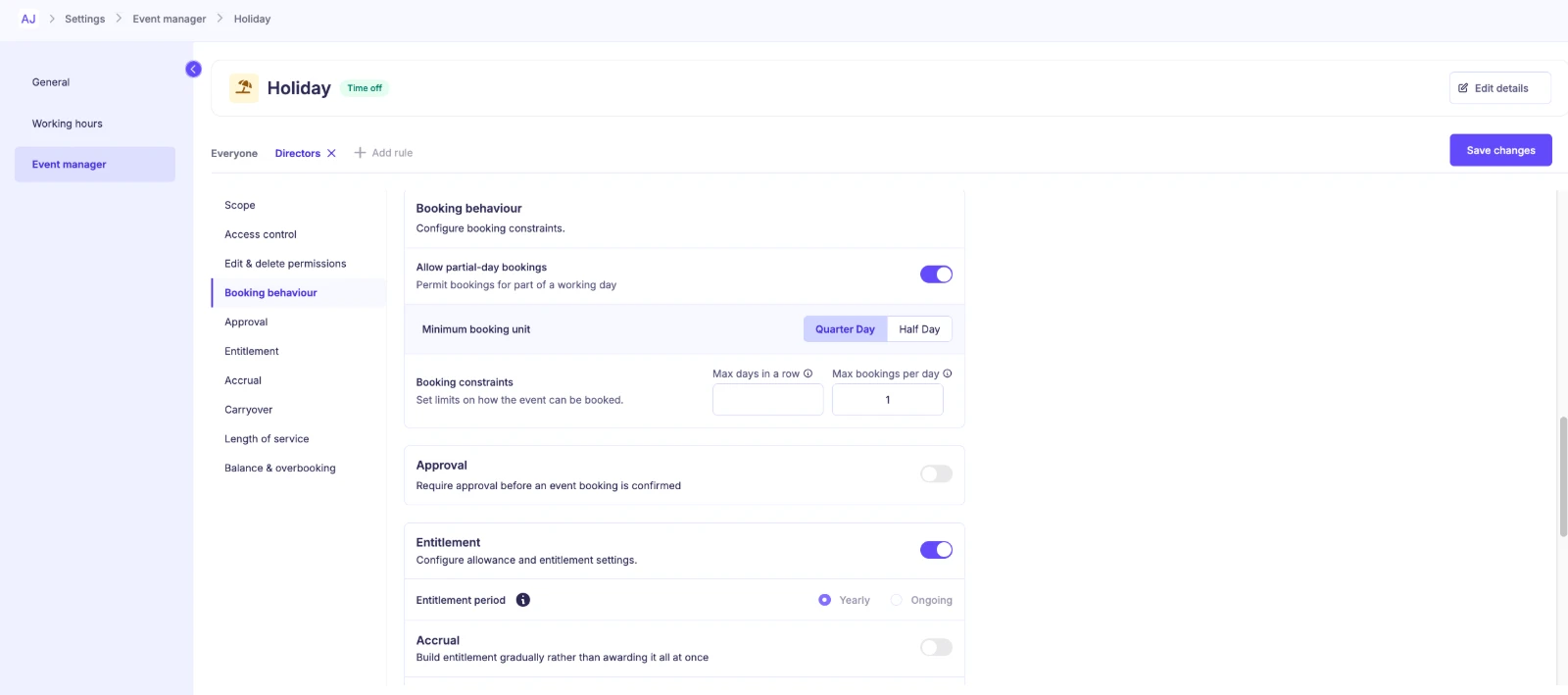
What Event Manager rules control
In Sense HR 7.0, rules define the people they apply to, how the Event can be booked and whether Approval is needed. The associated settings can include Duration modes and limits, depending on the Event.
That means a rule is not simply a label for the team. It is the practical behaviour that governs how a booking can be made.
New Working and Time-off Events also begin restricted to administrative roles, which allows the administrator to complete configuration before making the Event available more widely.
Don’t confuse Event rules with Access Roles
This is an important distinction when configuring Sense HR 7.0.
Access Roles determine whether a user can access the relevant employee and perform the Planner action in the first place.
Event Manager rules determine whether that action is permitted for the particular Event and group.
Both must allow the action. Granting permission through an Event rule does not override a missing Access Role permission.
For HR administrators, this is a reason to test each scenario with the actual role and employee group, not just review the configuration screen.
How to approach a team-specific policy setup
Start with the real policy rather than the software controls.
Map the groups. Which teams, roles or populations genuinely need different leave rules?
Define the difference. Is it an approval requirement, an allowed booking duration, who can book on someone’s behalf or another setting?
Configure one underlying Event where appropriate. Use the relevant Event Manager rules for the differing groups.
Check Access Roles. Confirm the intended users can reach the employees and Planner actions they need.
Test representative cases. Try the expected booking as an employee, manager and administrator for each affected group.
Document the rules. A configuration can be correct today and confusing to the next HR administrator in six months. Keep a plain-English summary of who can do what.
Questions to ask before changing approval policies
Do groups overlap? Which rule will apply in that scenario? What happens when an employee moves departments? Does the person approving a request have the necessary employee access? Will the same Event be visible appropriately in reports?
Every organisation’s group structure is different, so administrators should test overlapping groups and edge cases in their environment rather than assume a priority order.
Frequently asked questions
Do we need a separate Holiday Event for every department?
Not simply because groups have different booking or approval behaviour. Sense HR 7.0 supports multiple rules for one Working or Time-off Event.
Can an Event rule grant access that a person’s Access Role denies?
No. Both Access Role permissions and the relevant Event rule must allow the action.
Does every new Event become available to employees immediately?
New Working and Time-off Events initially restrict access to admin roles, giving administrators time to configure them.
Fewer duplicate Events, clearer policies
A policy can be different without the leave type becoming a different thing. By separating the shared Event from its group-specific rules, Sense HR 7.0 gives administrators a clearer way to manage real organisational differences.
Explore Sense HR Holiday & Leave Management or bring your most complicated approval policy to a demo.
This guide is part of our Sense HR 7.0 release series. See everything that’s new in Sense HR 7.0.