Custom HR Software

The system that fits your way of working

Build your own HR information screens, add custom fields and labels, create forms or documents, and design workflows to automate your HR processes. Sense HR is the HR system that is truly yours!

Watch the video

Add custom data fields

Don’t force everything to fit pre-defined labels, add as many custom data fields as you like! Employee records can be customised with unlimited levels of detail, so you can always instantly find any important information about any worker in your system.

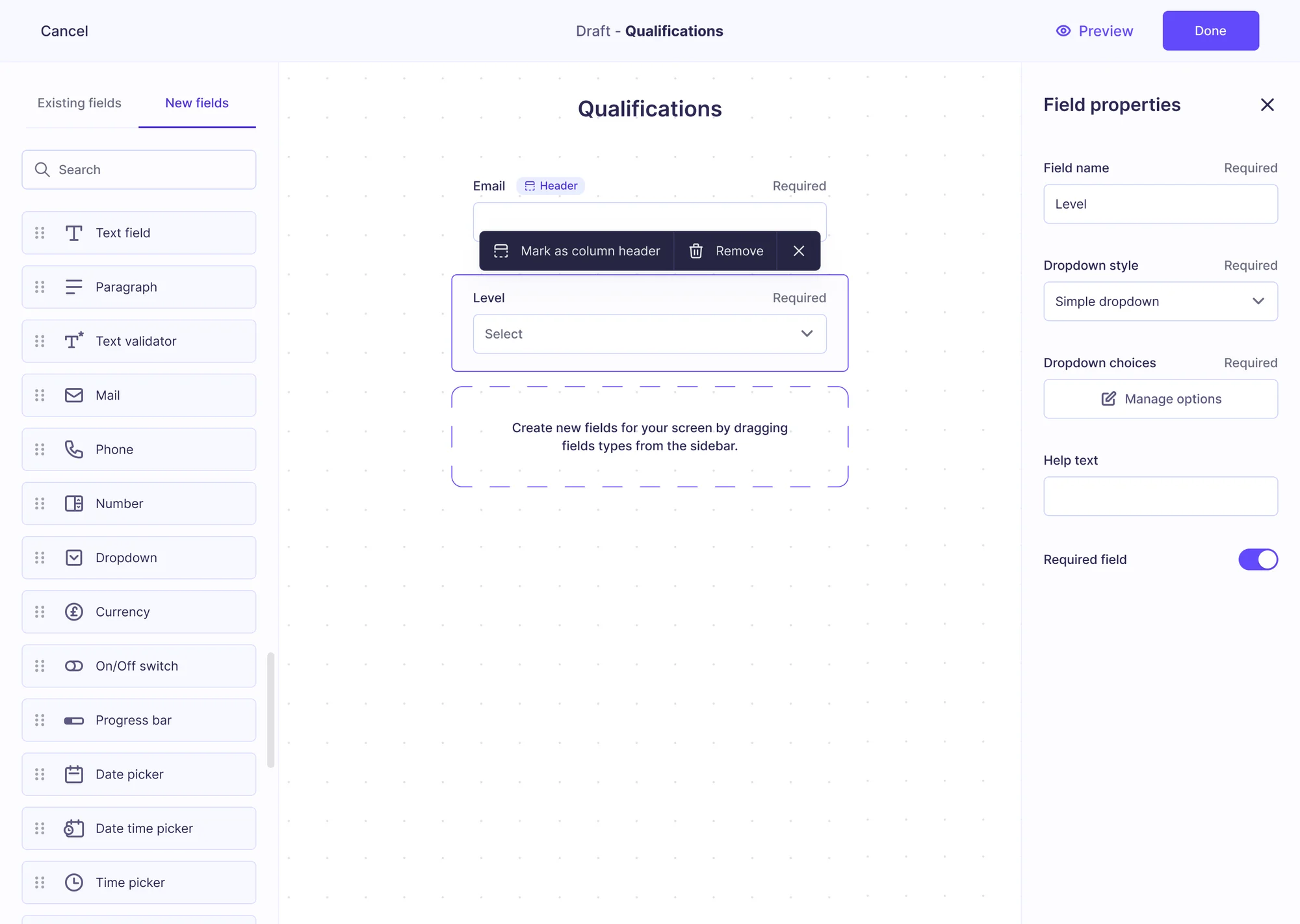
Design your own screens

Use Screen Designer to build new screens to capture any type of custom information, from uniforms and company cars to qualifications and equipment. Add your own fields and sections, rename existing labels, and decide exactly how each screen looks inside an employee’s profile.

Custom worker type templates

Not every worker needs the same information on file. Custom profile templates let you decide which screens appear in each type of worker’s profile, so that office staff, frontline teams, contractors, seasonal staff and agency workers can each have their own unique employee records.

Full control

Your data, your rules

  • Control what people see and doBuild your own access roles to decide who can see and do what, right down to individual screens and fields. For example, you might want employees to have different access settings to managers, and contractors to have different access settings to full-time employees.
  • Automate your custom dataEvery custom screen and field feeds into the workflows and automations you install, to trigger approvals, reminders, and other automatic actions. There are over 100 workflows to choose from in our pre-built library, or you can build your own with our no-code workflow builder.Browse HR Workflows
Features

Make every part of Sense HR your own

Custom screens

Create information screens for any type of data, from uniforms and company cars, to hobbies and interests.

Custom titles and fields

Edit titles and field labels in any screen, including the pre-built screens that come pre-loaded with the system.

Custom user profiles

Assign custom profiles and access rights to each user type, to control what your people can see or do.

Screen Designer

Design how each section displays, and create different views based on role, location, or worker type.

Discover a customisable HR system for yourself

Book a free demo or start your free trial to discover an HR system that fits your way of working with Sense HR.

FAQ

Frequently asked questions

Can I customise workflows and reports?

Yes. Sense HR lets you tailor approval steps, notifications, and reporting dashboards so they match your company’s structure and processes. That includes custom compliance reporting options when you need them.

Can I add custom fields to employee records?

Yes. With Screen Designer you can add as many custom fields and screens as you need, rename the labels on existing screens, and choose which screens appear for different groups of workers using profile templates.

Do I need a developer to customise Sense HR?

No. Screens, fields, profile templates and access roles are all set up from the admin settings in Sense HR, with no coding needed.

Can different employees see different information?

Yes. Access roles control which screens, fields and records each person can see or edit, and screen variants control what people see and complete during workflow tasks.

Can I import existing data into my custom fields?

Yes. Bulk upload templates let you import both standard HR data and the custom screens and fields you’ve created, so you don’t have to re-key records by hand.

Which plan includes customisation?

Custom fields and screens are part of the Elite plan. The Team plan uses fixed, ready-to-use screens, designed to be simple and self-serve.