Meet Snappy
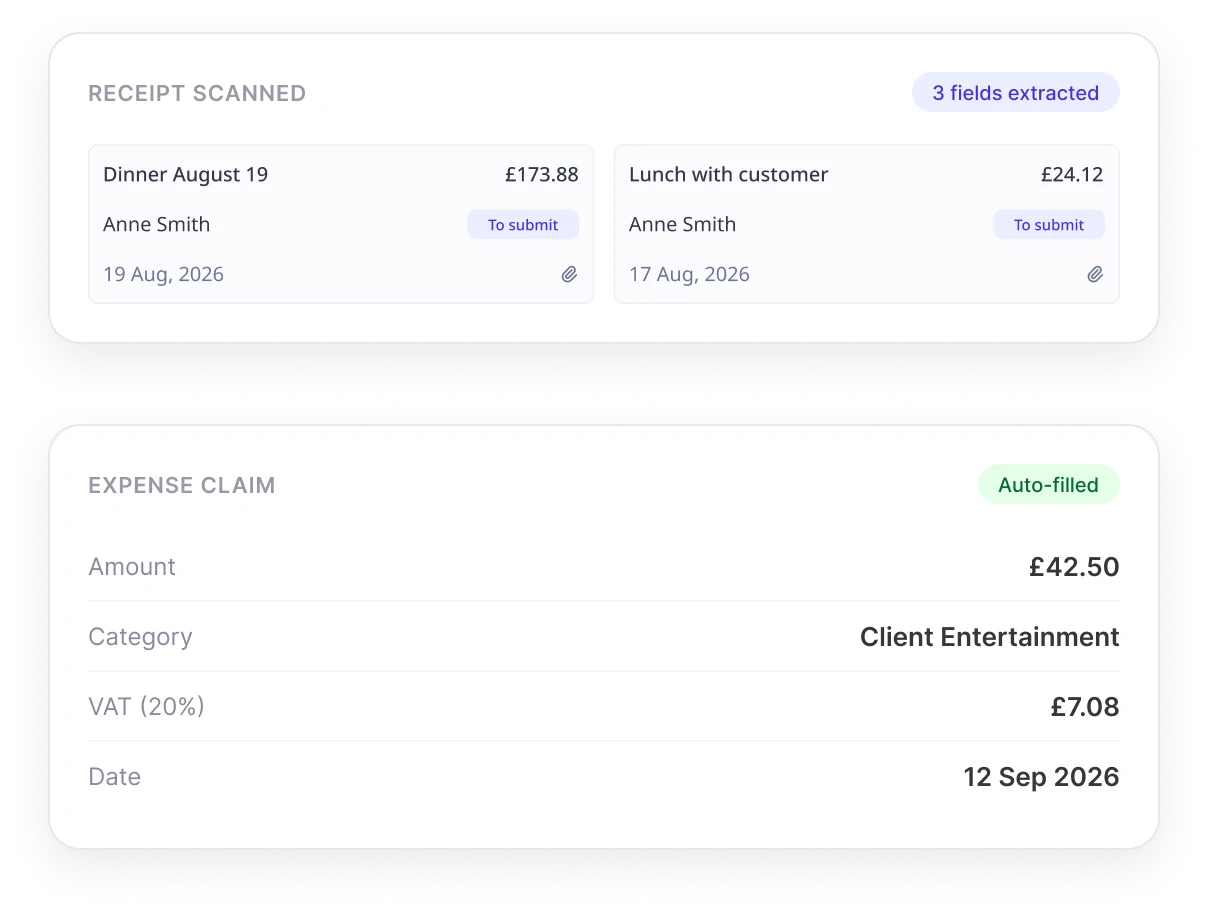
AI agent Snappy reads pictures of expense receipts, then automatically files them as an expense claim for approval. Snappy also scans receipts against your expense policies, flags any suspicious activity for the approving manager.
Snapped a receipt from The Ivy — lunch with a client.
Got it! £42.50, filed under Client Entertainment, VAT calculated. Ready to submit?
Watch this short video to learn more about Snappy
 Snappy: snap a receipt, file a claim
See How Snappy Works
- 01Snap PictureEmployee photographs receipt in app.
- 02Auto-Fill FormSnappy adds amount, category, and tax to the form.
- 03ReviewEmployee checks it looks right then submits.
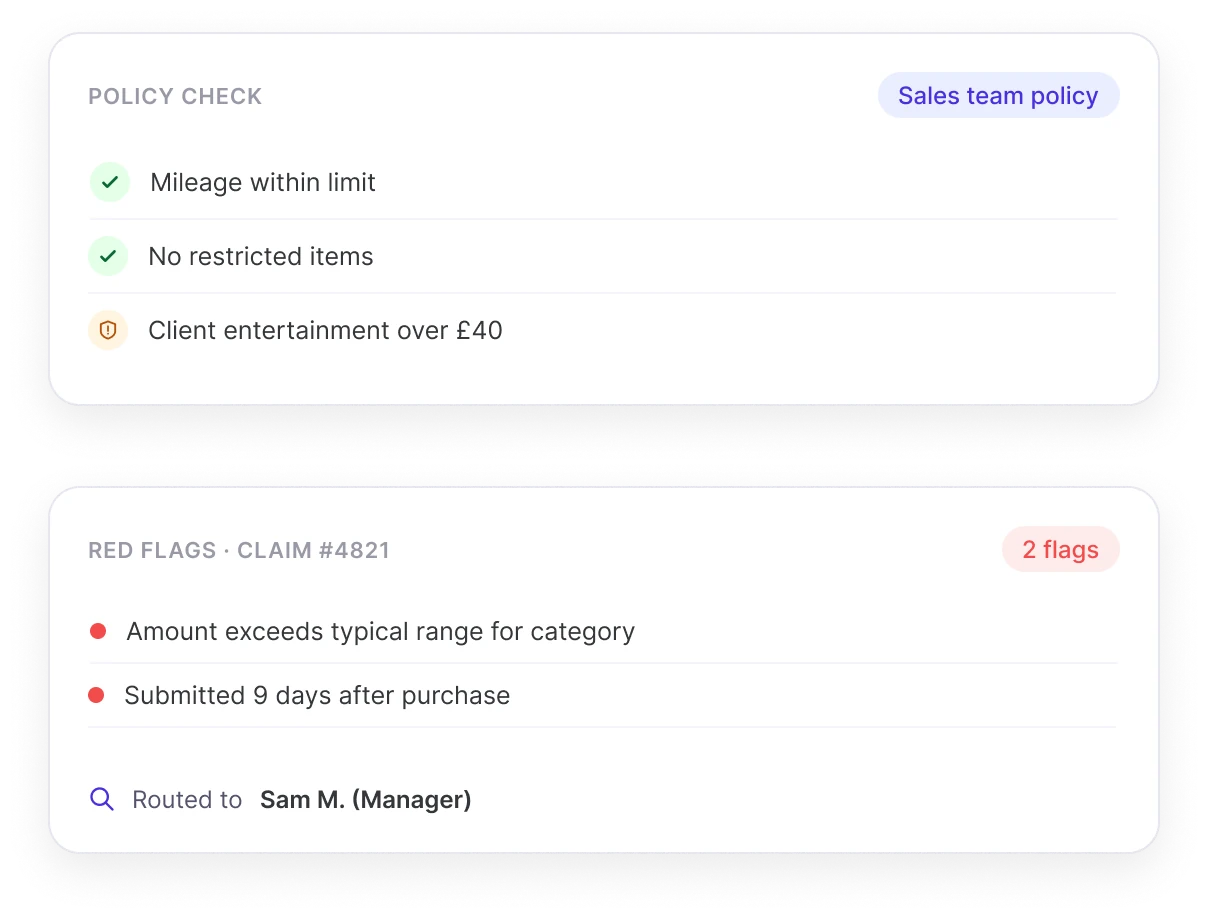
- 04Policy CheckSnappy checks for exceeded limits or exclusions.
- 05Approval SummaryApprovers get completed form with red flags.
Snappy takes away paperwork and form-filling from busy employees out on the road, and helps approvers spot things that shouldn't be there.
"Photo Finish" Claims
The only thing employees need to do is take a picture of their receipt. Snappy does the rest, and the completed expense claim can be sent for approval.
- Snap Each ReceiptSnappy makes expense claims stress-free, with no forms to fill or attachments to handle. Employees simply take a picture of each receipt, and let Snappy handle the rest.
- Auto-Populate ClaimsSnappy scans each receipt and auto-populates each field of the expense claim, such as amount, category, and tax. You can even add your own custom fields!
- No More PaperEach receipt can be snapped and saved on-the-go, with no need to save paper receipts until the end of the week or month.
Automatic Policy Checks
Every claim is checked against your expense policy and routed to the right approver, with a summary of anything that might need attention.
- Policy Violation ChecksSnappy runs each expense claim against the relevant expense policy for that employee, for example to check for things like mileage limits or restricted items like alcohol.
- Automatic Approval RoutingSnappy knows who to send each completed claim to, and can even handle rules for multiple approvers or non-standard expense approval workflows.
- Red Flag SummarySnappy sends each completed expense claim to the approving manager, along with a report highlighting any red flags or anomalies. The approver always makes the final call.
Meet Snappy in Person!
Share your contact details and one of our HR experts will be in touch to show you how Snappy can give your employees a faster, smarter way to submit and approve expense claims.
Common questions
What is Snappy?
Snappy is an AI agent within Sense HR that reads a photographed receipt, automatically fills in the details of an expense claim, checks it against the relevant expense policy, and sends it to the right approver.
How does Snappy turn a photo of a receipt into an expense claim?
An employee takes a photo of their receipt in the app, and Snappy scans it to automatically populate fields such as the amount, category and tax, so the employee doesn't need to type the details in manually.
Does Snappy check expense claims against company policy?
Yes. Snappy checks each claim against the relevant expense policy for that employee, for example flagging mileage that exceeds a limit, or restricted items such as alcohol, and includes any red flags in the summary sent to the approver.
Who approves expense claims processed by Snappy?
A human approver always makes the final decision. Snappy prepares the completed claim and a summary of anything that might need attention, but does not approve or reject claims itself.
Can Snappy route claims to different approvers automatically?
Yes. Snappy knows who each completed claim should be sent to, and can apply rules for multiple approvers or non-standard approval workflows.
Does Snappy support custom expense fields?
Yes. In addition to standard fields such as amount, category and tax, employers can add their own custom fields for Snappy to populate when scanning a receipt.
What is OCR receipt scanning?
OCR, or optical character recognition, is the technology that reads text from a photographed or scanned document, such as an expense receipt, and converts it into usable data, such as the amount, date, or merchant name. It's the underlying technology that lets an app turn a photo of a receipt into a pre-filled expense form.
How can businesses reduce time spent on expense claims?
Common approaches include removing manual form-filling by scanning receipts directly into a claim, automatically checking claims against expense policy rather than reviewing every claim manually, and routing claims straight to the correct approver rather than relying on email or paper submissions.
What are common signs of expense fraud?
Common red flags include claims that exceed policy limits, duplicate submissions of the same receipt, mileage or amounts that don't match typical patterns for that employee or role, and restricted or personal purchases submitted as business expenses. Automated policy checks can flag these for an approver to review before a claim is paid.
What should a UK employee expense policy cover?
A typical UK expense policy sets out what can be claimed, such as travel, mileage rates, and subsistence, any spending limits, what evidence is required (such as a receipt), and the approval process. Clear limits and rules make it easier for both employees and any automated checking tool to know what's allowed.
Is receipt and expense data kept secure?
Yes. Sense is ISO 27001 certified, and expense claims and receipt images processed by Snappy are stored in secure, UK-hosted data centres compliant with GDPR, and are never used to train any AI models.