“Can I just see what needs my attention?”
That may be the most useful question a busy HR professional asks all day.
An administrator needs a view across the organisation. A manager needs their own information and the team’s priorities. An employee usually just wants to know what needs doing, how much holiday remains and when the next shift starts.
Sense HR 7.0 redesigns the Dashboard around those different jobs. The update also adds a Standard working day setting that may look small but has consequences for how some calculations are made.
A different view for each role
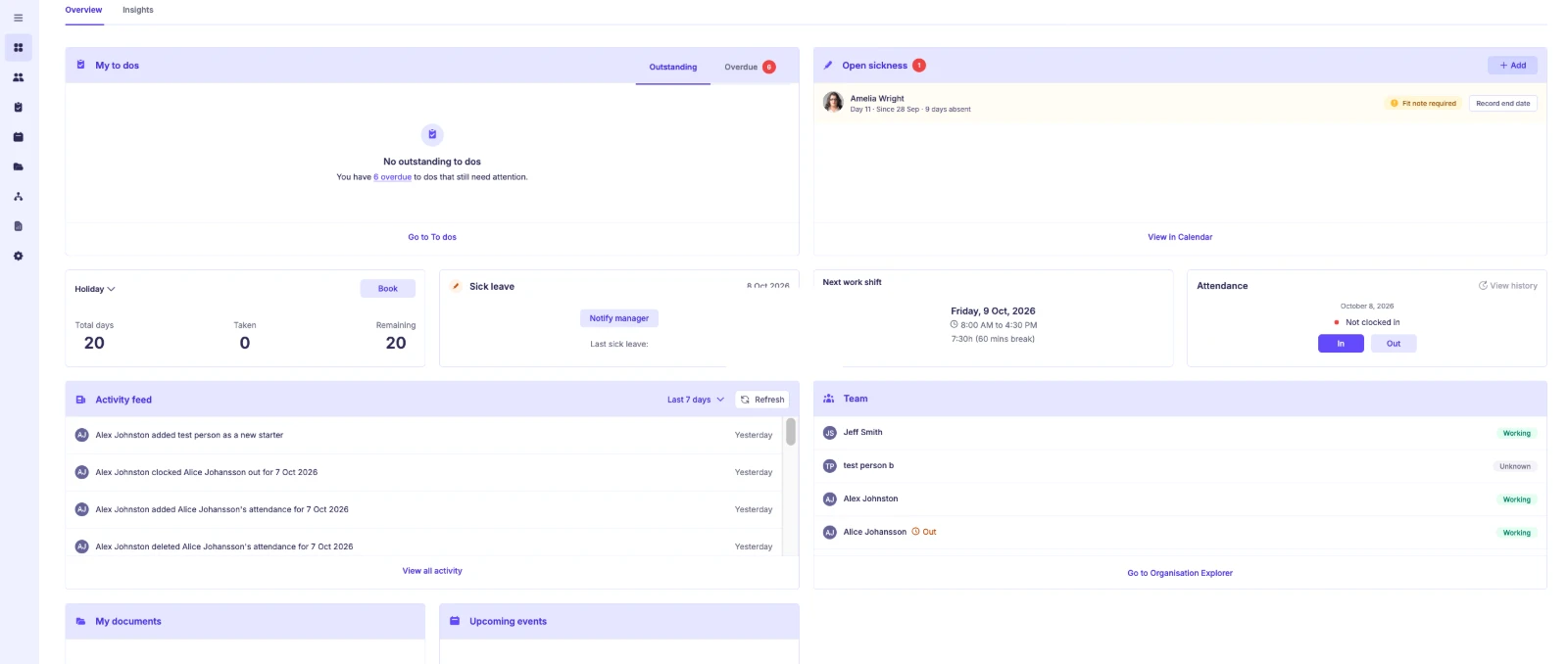
The new Dashboard is designed to show relevant information rather than identical information to everybody.
Administrators can see organisation-wide items needing attention.
Managers see their own information alongside information about their teams.
Employees get a simpler personal view, including to dos, holiday and next shift.
The principle is straightforward: show users the work they can act on instead of making them navigate every possible area of the HR system.
Two widgets worth a closer look
Open sickness highlights sickness absences that still do not have a recorded return date. This complements the new open-ended Sickness booking and helps relevant users see which cases remain open.
Attendance allows people to clock In and Out from the Dashboard, where the organisation has enabled that option.
The permission to clock in or out is separate from permission to manually add or edit Attendance. Employees can therefore be permitted to clock themselves without necessarily being allowed to rewrite their attendance history.
Better visibility into changes
The update also includes improvements that sound modest but can save repeated questions.
Planner filters in an employee profile can remain selected when users move between views and people. Activity information shows who changed what and when, giving users more context for changes such as an amended holiday booking.
For teams that use Bulk Upload, existing uploads continue to work, while updated templates support the new booking options.
The setting every administrator should check
Sense HR 7.0 introduces Standard working day (Hours).
Sense HR normally uses an employee’s scheduled Working hours for calculations. Sometimes those hours are missing or cannot be used, such as for certain bookings on non-working days or imported records without an associated schedule.
The Standard working day is a fallback value for those cases. Organisations can set a default, with an optional employee-specific override.
That value can matter in several places: Planner bookings and amendments, Public Holidays, day-to-hour calculations, Bulk Upload, APIs, entitlement, reporting and payroll.
This is why a value that looks like a single setting deserves careful review.
Where to find it
The organisation-wide setting is under:
Settings > Calendar & Planner > General
Employee overrides are set in the person’s Working hours schedule.
Before changes go live, check the default hours against the organisation’s intended standard and confirm any employee exceptions. Use representative booking cases to make sure the results match expectations.
Will old bookings change after the upgrade?
No, not automatically.
Existing bookings are not recalculated simply because Sense HR is upgraded to 7.0. The new calculation is used for new bookings, and for existing bookings if they are later edited.
That distinction is important if HR is comparing new results with historical records.
Questions to ask during rollout
Can administrators quickly see the open sickness cases? Can managers see their teams’ relevant information? Can employees perform the Attendance actions they need without getting broader editing permission? Are Working hours complete? Is the Standard working day value correct? Are affected teams aware of the new Dashboard layout?
A good release rollout is not finished when the new interface appears. It is finished when the people using it understand their next action.
Frequently asked questions
Can employees clock in from the Dashboard?
Yes, where Attendance has been enabled for them. That does not automatically give permission to manually edit attendance records.
Where are Standard working day hours configured?
At organisation level under Settings > Calendar & Planner > General, with optional employee overrides in the Working hours schedule.
Are old bookings recalculated just because of 7.0?
No. They are recalculated under the new approach only if edited.
Seven days, one more useful system
From quarter-day leave to open-ended sickness, group-specific rules, entitlement options and clearer TOIL awards, Sense HR 7.0 is about making everyday HR requests easier to record and manage.
The Dashboard brings those tasks into focus for the people responsible for them.
Explore Sense HR and ask for a walkthrough of the features most relevant to your team.
This guide is part of our Sense HR 7.0 release series. See everything that’s new in Sense HR 7.0.