“Can I take two hours off on Thursday?”
It is a small request. But if the HR system only accepts whole days, it can create a much bigger problem: somebody books the wrong amount, adds a note, recalculates entitlement manually or keeps a separate spreadsheet to make it right.
The question for HR teams is not simply whether employees can request flexible leave. It is whether the booking, calendar record and time calculation describe the same absence.
Sense HR 7.0 introduces more precise ways to make those bookings in Calendar & Planner.
Three ways to record an Event
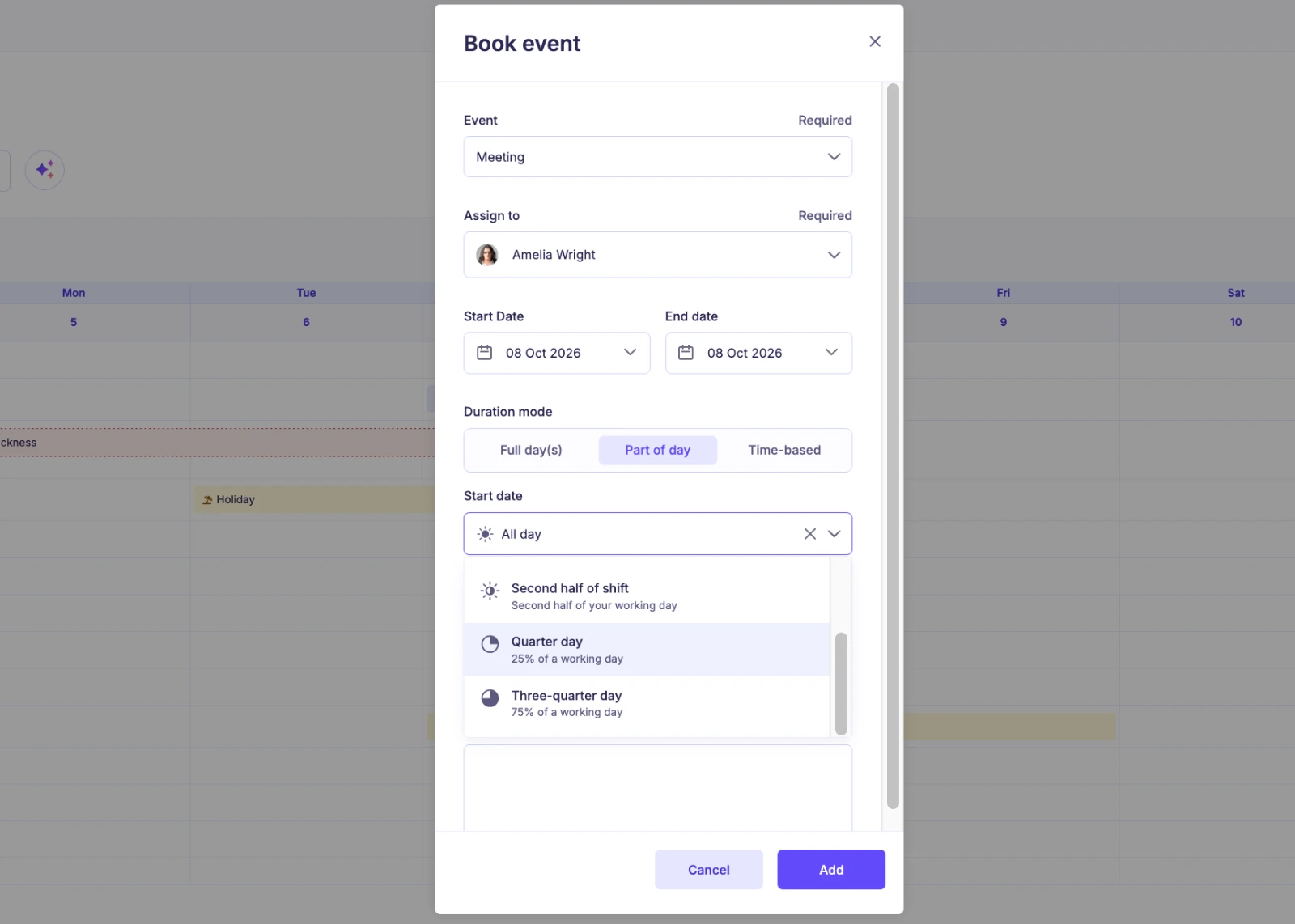
An Event can use one of three Duration modes, depending on its configuration:
- Full day(s): for one or more complete working days.
- Part of day: for proportions of a working day. The minimum booking unit can be Half Day or Quarter Day, allowing options such as first or second half of shift, quarter day and three-quarter day.
- Time-based: for a specific Start and End time, with duration calculated in hours and minutes.
This matters because “half a day” and “two hours” are not necessarily equivalent. A person working a short shift and a person working a long shift can need different booking methods. The right mode depends on how the organisation manages that Event and how the employee works.
One trip, one booking, even with partial days
Imagine an employee needs leave from Tuesday lunchtime until Thursday morning.
A rigid calendar might force an administrator to create separate records for Tuesday, Wednesday and Thursday. That makes a straightforward absence harder to understand and easier to amend incorrectly.
In Sense HR 7.0, a multi-day Part of day or Time-based Event can start or end part-way through a working day. The first and last dates can be partial, while the working days between them count in full.
The record follows the real span of the booking rather than a set of artificial fragments.
Five situations where precise leave bookings matter
1. A medical appointment. An employee needs a defined period away from work rather than an entire day.
2. A school event. A parent needs only the second half of the shift.
3. A home appointment. A team member has to wait for an engineer and wants to use a quarter-day.
4. A journey with an afternoon departure. The employee starts leave halfway through the first day and returns part-way through the last.
5. Different shift lengths. An employee’s booked time needs to reflect their working schedule rather than an assumed nine-to-five day.
These are examples of the problems the booking modes are designed to address, not a claim that every Event should offer every Duration mode.
Set the rules before employees start booking
Flexibility does not mean abandoning policy controls. HR should decide which booking method is appropriate for each Event.
For each leave type, review:
- Whether requests should be made in days, fractions of days or exact times.
- Whether the minimum Part of day booking unit should be Half Day or Quarter Day.
- Who is allowed to make the booking and whether approval is required.
- Whether different employee groups need different rules for the same Event.
- Whether Working hours are complete enough to support the intended calculation.
Sense HR’s Event Manager rules and Access Roles work together, so the right people have access to the right actions.
What about employees without usable Working hours?
Some calculations cannot use scheduled Working hours. For those cases, Sense HR 7.0 introduces Standard working day (Hours).
HR can set an organisation-wide default and, where needed, an employee-specific override. Sense HR uses this fallback when it cannot use scheduled Working hours for the calculation.
Existing bookings are not automatically recalculated simply because the value changes. New bookings use the applicable calculation; an existing booking is recalculated if it is edited.
What to look for when evaluating leave booking software
Ask the vendor to demonstrate the awkward cases, not just a straightforward full-day holiday.
Can the system book 2pm to 4pm? Can it handle a quarter-day? Can a multi-day absence start halfway through the first shift? Can different departments use different permissions and approval requirements without creating multiple duplicate leave types?
Most importantly, can the employee, manager and HR administrator all see a consistent record?
Frequently asked questions
Does a half-day booking mean four hours?
Not necessarily. A half-day is a fraction of the applicable working day; an exact number of hours is better represented by a Time-based booking. The calculation depends on the Event mode and working-hours setup.
Can the same Event support different employee groups?
Yes. Sense HR 7.0 allows multiple rules for a Working or Time-off Event, with different applicable groups and booking behaviour.
Can a booking begin or finish mid-shift?
Yes. Multi-day Part of day and Time-based bookings can have partial first and last days.
Make the system fit the request
Leave administration should not turn a two-hour absence into a full-day accounting exercise. More precise booking options let HR record what was actually agreed, while keeping the controls needed to manage it.
Explore Sense HR Holiday & Leave Management or ask for a demonstration of a real booking from your team’s policy.
This guide is part of our Sense HR 7.0 release series. See everything that’s new in Sense HR 7.0.