HR is easy… when you can just say “Yes, you can”.
“Can I take Friday afternoon off?” “We don’t know when Priya will be back from sickness.” “Can the warehouse team need approval while the directors book the same type of leave themselves?”
These are ordinary questions in real workplaces. Yet they can create remarkably complicated admin when the software assumes that everyone works the same hours, takes whole days off and follows exactly the same policy.
Sense HR 7.0 is built around a more useful question: what if the system could adapt to the way your people actually work?
The update brings greater flexibility to Calendar & Planner, Event Manager, entitlement, TOIL and Dashboards. Here is what has changed, what it means in practice and where to explore each capability in more depth.
What’s new in Sense HR 7.0?
Seven changes stand out:
- More precise bookings. Record full days, half days, quarter days or an exact start and end time, depending on the Event’s configured Duration mode.
- Open-ended Sickness. Record an absence without entering a made-up return date.
- Different rules for different people. Configure more than one rule for a Working or Time-off Event, with rules applying to different groups.
- Richer entitlement. Choose Yearly or Ongoing entitlement periods, and one of five Yearly calculation approaches.
- Clearer TOIL history. Track each individual award, how much has been used and what remains or expires.
- A Standard working day fallback. Set a consistent hours value when scheduled Working hours cannot be used.
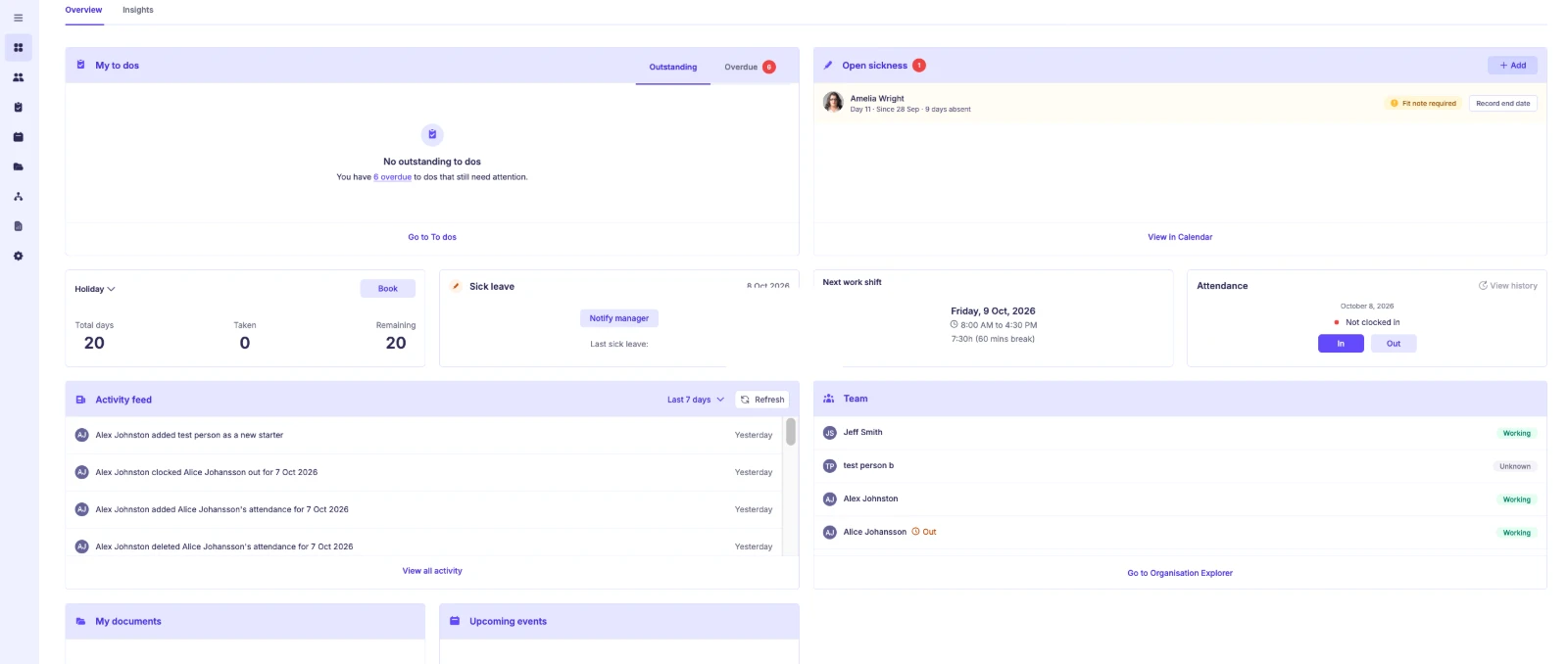
- Role-based Dashboards. Give administrators, managers and employees more relevant information and actions.
Leave requests don’t have to fit a full-day box
Someone needs the second half of a shift for an appointment. Someone else wants a quarter-day. A third person needs to be away from Tuesday lunchtime until Thursday morning.
Sense HR 7.0 supports Full day(s), Part of day and Time-based Duration modes for Events configured to allow them. A single multi-day booking can begin or end part-way through a working day, so HR does not need to assemble several records to describe one absence.
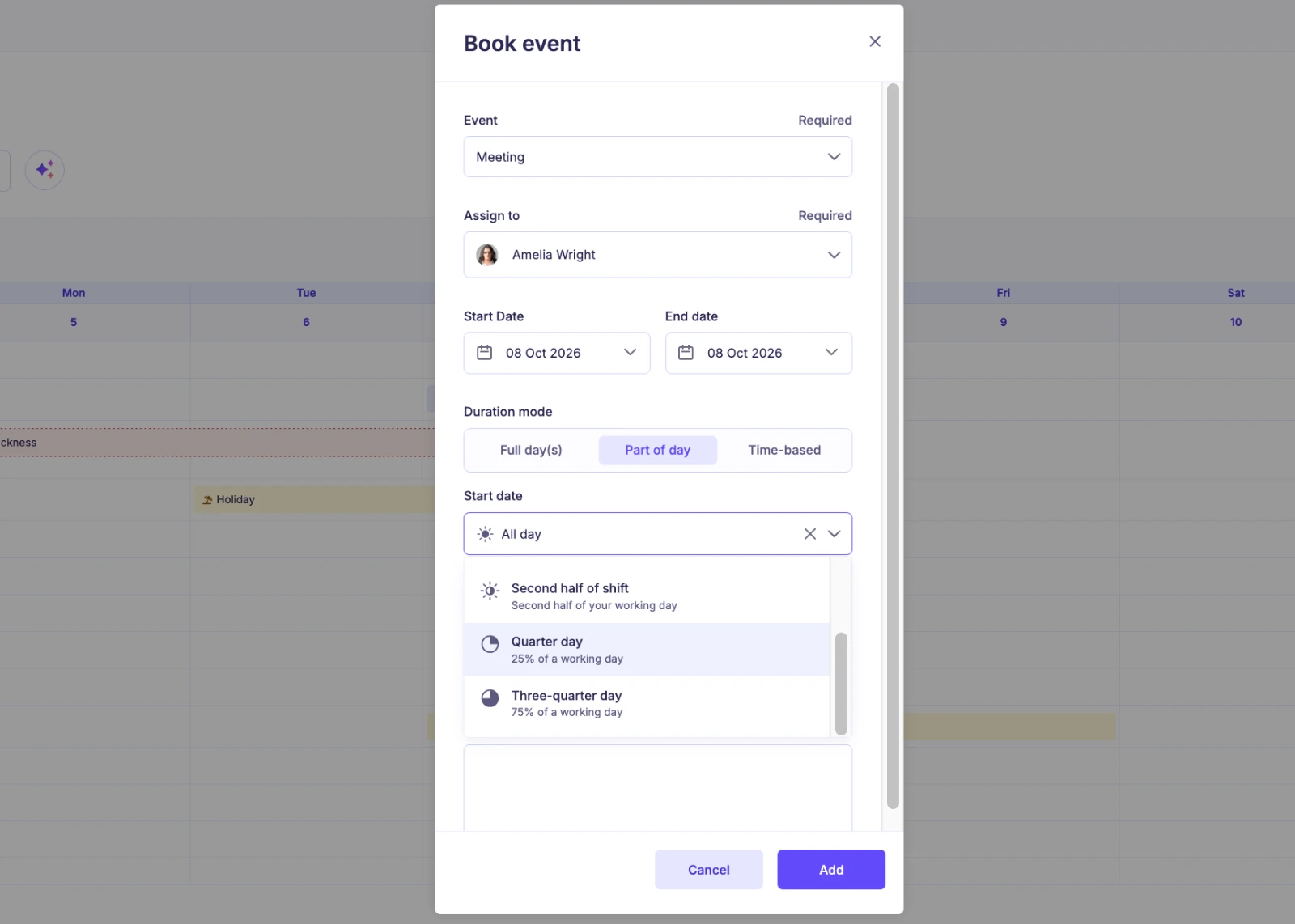
The benefit is not novelty for its own sake. It is a more faithful record of the time actually requested. Read the detailed guide to flexible leave bookings.
When sickness has no known end date
Sickness rarely follows a neat schedule. An employee might leave at 2pm, remain off for several days and have no reliable date to return.
With 7.0, Sickness can be recorded in full days, parts of days or exact times, including an open-ended booking with no End date. That one record remains open until the return is recorded. Relevant users can also see open cases through the Open sickness Dashboard widget.
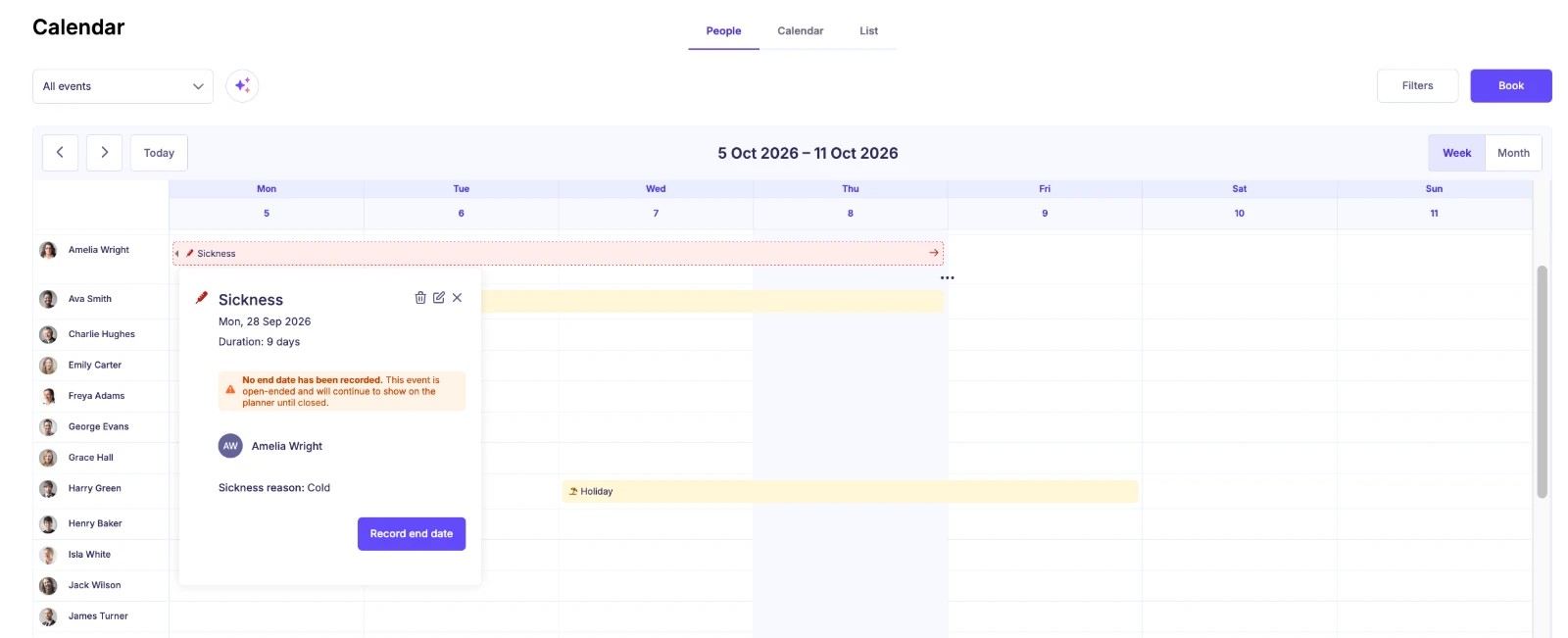
Fit note and Return to Work requirements are configurable by Sickness reason, so recording the absence and following the process can stay connected. Read the detailed open-ended sickness guide.
The same event can follow different team rules
“Holiday” should not need three different names just because the rules vary across a business.
In Event Manager, 7.0 allows multiple rules for the same Working or Time-off Event. For example, a warehouse group might require approval while directors can self-book, according to their configured rule.
Event Manager works alongside Access Roles: the role must permit the employee and Planner action, and the applicable Event rule must permit the particular booking. Both matter.
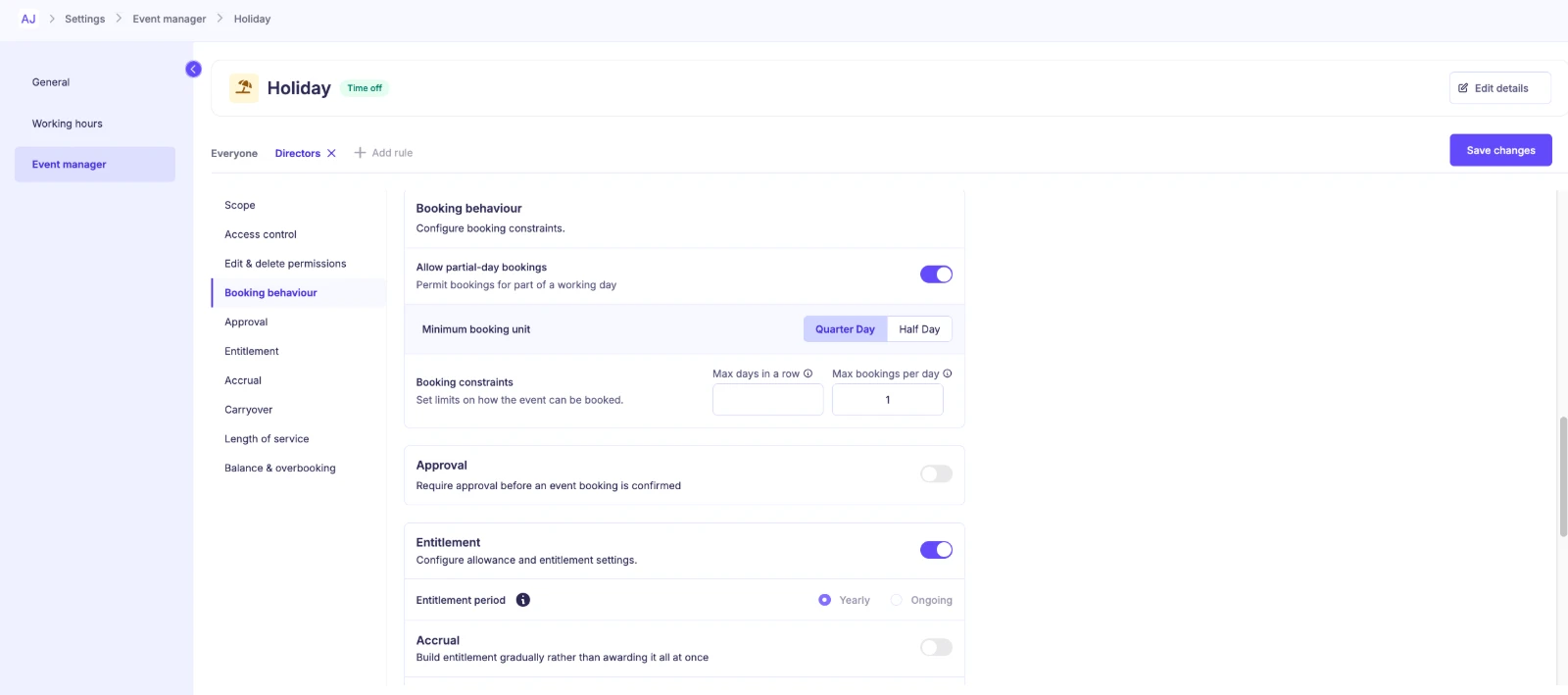
Explore team-specific Event rules.
Entitlement that follows the policy you’ve actually written
A fixed birthday allowance, a pro-rata calculation for a new starter and a step-based policy are not the same problem. Sense HR 7.0 gives Yearly entitlement five calculation choices: Fixed, FTE-based, Pro-rata – daily, Pro-rata – monthly and Step-based.
Yearly or Ongoing entitlement periods let teams distinguish balances that reset each holiday year from balances that continue. Carryover rules and cumulative Length of service awards add further flexibility.
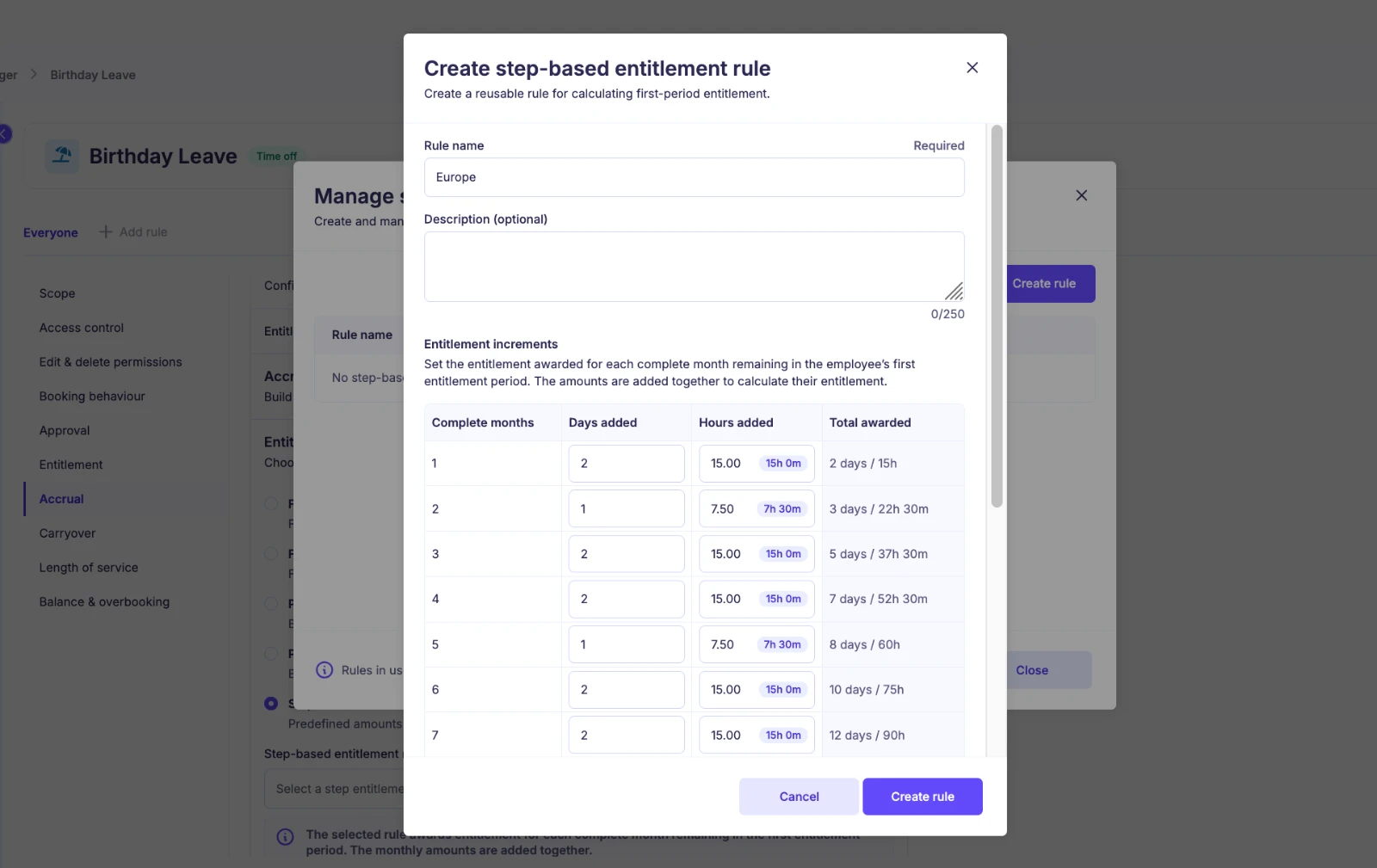
Read the entitlement calculation guide.
TOIL with the history behind the balance
An overall TOIL balance tells an employee how much time they can book. It doesn’t necessarily explain where those hours came from, which award they used or whether an award should expire.
Sense HR 7.0 tracks individual TOIL awards, including amounts awarded, used, remaining and expiry dates where configured. Employees still book against their overall balance; the system uses the awards due to expire first.
Dashboards and the small settings that make a big difference
The redesigned Dashboard serves different roles. Administrators see organisation-wide information, managers see their own information alongside their teams’, and employees see their personal priorities.
The update also introduces a Standard working day (Hours) fallback for calculations that cannot use an employee’s scheduled Working hours. Organisations can set a default and an employee-level override. Read the full Dashboard and Standard working day guide.
Important for existing customers: review Settings > Calendar & Planner > General and check that your Standard working day is correct. Existing bookings are not automatically recalculated by the upgrade; the updated calculation applies to new bookings or to existing bookings if they are edited.
Frequently asked questions
Can employees book a quarter of a day off?
Yes, for Events configured to allow Part of day bookings with Quarter Day as the minimum booking unit. Available options depend on the Event’s settings.
Can sickness be recorded without a return date?
Yes. Open-ended Sickness remains one booking until a return is recorded.
Can different teams follow different holiday rules?
Yes. Multiple Event Manager rules can apply to different groups, alongside Access Role permissions.
Will 7.0 change my old bookings automatically?
No. The Standard working day calculation does not automatically recalculate historical bookings. It applies to new bookings and to existing bookings if they are edited.
Better software for less tidy workplaces
Real teams work irregular shifts, have appointments, take sick leave without a known return date and operate policies that look nothing like a standard spreadsheet.
Sense HR 7.0 gives HR teams more ways to record those situations accurately. The goal is simple: when somebody makes a reasonable request, the answer should not depend on whether the software can cope with it.
Already use Sense HR? Check your Standard working day and review the Event Manager rules available in your organisation.
Considering Sense HR? Explore Holiday & Leave Management and Absence Management, then book a demonstration to see how the system would handle your policies.